
Download My Movie Manager – movie catalog, organize movies, IMDb integration, movie collection, watch tracking, genre organization, movie playback, movie library
Overview
My Movie Manager is a productivity-focused mobile application designed for film enthusiasts seeking a structured way to manage their personal movie libraries. The app enables users to catalog their digital movie collections with minimal effort, offering foundational tools that streamline organization and viewing. By automatically identifying movie files and integrating with IMDb, it reduces the manual work typically associated with building a digital library. This functionality is particularly useful for users who maintain large collections across multiple devices or storage drives.
The app targets casual and dedicated movie collectors who value both accessibility and detailed metadata. Whether organizing a home media library or tracking personal viewing habits, My Movie Manager provides a centralized interface to manage films by title, genre, and status. Its emphasis on watch tracking and favorite lists supports users in curating personalized viewing experiences, making it easier to revisit beloved films or discover new ones based on past preferences.
Although the developer did not provide additional background details, the app’s release date of September 17, 2012, places it among early mobile tools for media management. This historical context highlights its role as a pioneer in bringing movie cataloging features to smartphones. The app’s current free pricing model and lightweight 2.1 MB size suggest a focus on accessibility and low system impact, making it suitable for older or entry-level Android devices.
Key Features & Functionality
My Movie Manager delivers a set of practical tools tailored to the core needs of movie collectors. Each feature is designed to minimize user input while maximizing utility and organization.
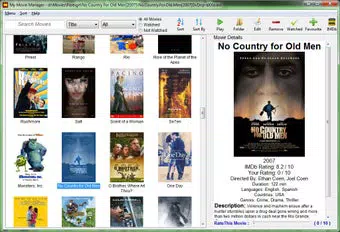
- Automatic Movie Identification: The app scans local storage to detect movie files and fetches metadata from IMDb, including titles, release years, cast, and plot summaries. This eliminates the need for manual data entry, saving time and reducing errors.
- Genre Organization: Movies are automatically sorted into genres such as Action, Comedy, Drama, and Horror. This categorization enables quick navigation and helps users filter content by mood or preference, enhancing the overall browsing experience.
- Watch Tracking: Users can mark films as watched and add them to a favorites list. This feature supports personal viewing history and helps users keep track of incomplete or rewatch-worthy titles.
- Direct Movie Playback: With a single tap, users can launch playback directly from the app interface. This integration simplifies access to movies without switching between file managers and media players.
- User Feedback Encouraged: As this is the first version of the app, the developer actively invites user input to guide future updates. This open approach fosters community involvement and ensures the app evolves based on real user needs.
For example, a user with a collection of 100+ films can use the app to instantly categorize and tag each movie, then filter by genre to create a “Weekend Watch” playlist. Similarly, someone tracking their annual movie consumption can use the watch tracking feature to monitor progress and revisit favorites.
Interface, UX & Performance
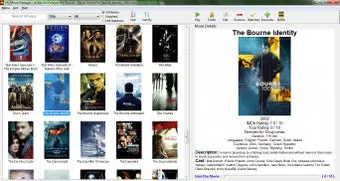
The user interface of My Movie Manager is designed with simplicity and functionality in mind. The layout prioritizes clear visual hierarchy, presenting movie thumbnails, titles, genres, and status indicators in a clean, grid-based format. Navigation is intuitive, allowing users to browse collections, filter by genre, and access playback options with minimal taps.
Visual style is minimalistic, focusing on usability over decorative elements. This approach ensures fast loading times and consistent performance across various screen sizes and resolutions. The app maintains a responsive interface, with smooth transitions between views and immediate feedback when interacting with controls.
Although the developer did not list formal performance metrics, the app’s lightweight 2.1 MB file size suggests efficient resource usage. It is likely optimized for older Android devices, reducing battery drain and memory consumption. Stability appears to be a focus, as the app has maintained a consistent presence since its 2012 release without reported widespread issues.
Performance on different device categories—such as budget smartphones, mid-range tablets, and high-end devices—was not specified. However, the app’s small size and minimalistic design indicate broad compatibility. Users should expect reliable operation with standard Android file access permissions.
Platform Compatibility & Technical Requirements
My Movie Manager is available exclusively on the Android platform. The app requires Android OS, though specific version requirements were not listed by the developer. Given its release date in 2012, it likely supports older Android versions, making it accessible to users with legacy devices.
The application size is 2.1 MB, which is notably small for a media management tool. This compact footprint contributes to faster installation times and lower storage usage, ideal for users with limited device capacity. The app is currently free to download and use, with no in-app purchases or subscription fees reported.
Compatibility information was not fully disclosed. The developer did not specify minimum OS requirements, hardware capabilities, or supported file formats. Users should ensure their device can access local storage and media files to fully utilize the app’s features.
Pros and Cons
- Lightweight design at only 2.1 MB
- Free to download and use
- Automatic movie file identification via IMDb
- Genre-based organization for easy browsing
- Direct playback integration for seamless viewing
- Watch tracking and favorites list for personalization
- Community-driven development through user feedback
- Specific OS version requirements not disclosed
- File format support details not provided
- No cloud sync or backup features mentioned
- Limited visual customization options
- App has not been updated since 2012
- Developer contact or support channels not listed
FAQ
Is My Movie Manager safe to download?
Yes, the app is free and available through official Android channels. It does not require root access or suspicious permissions, and its small size suggests a low risk profile.
Can I use My Movie Manager on iOS devices?
No, the app is currently available only on Android. There is no official iOS version or release information.
Does My Movie Manager support streaming services?
There is no indication that the app integrates with streaming platforms like Netflix or Hulu. It focuses on local movie files and IMDb metadata.
How often is My Movie Manager updated?
The app was last released on September 17, 2012. No updates have been reported since then, though the developer encourages user feedback for future improvements.
Can I sync my movie library across multiple devices?
There is no information about cloud sync or cross-device synchronization. The app appears to function as a local tool, storing data on the device only.
Final Thoughts
My Movie Manager stands as a functional, no-frills solution for organizing personal movie collections on Android. Its core features—automatic identification, genre sorting, watch tracking, and direct playback—deliver tangible value to film lovers who want a simple, efficient way to manage their digital libraries. While the app has not been updated in over a decade, its lightweight design and free access continue to make it a viable option for users with older devices or those seeking a minimalistic approach to media management.
Though it lacks modern features like cloud backup, multi-device sync, and streaming integration, its focus on essential tools remains relevant. The app’s community-oriented development model invites users to contribute to its evolution, suggesting potential for future enhancements.
For anyone looking to catalog their movie collection, track what they’ve watched, and enjoy seamless playback—all without cost or complexity—My Movie Manager offers a solid foundation. Download My Movie Manager now.


